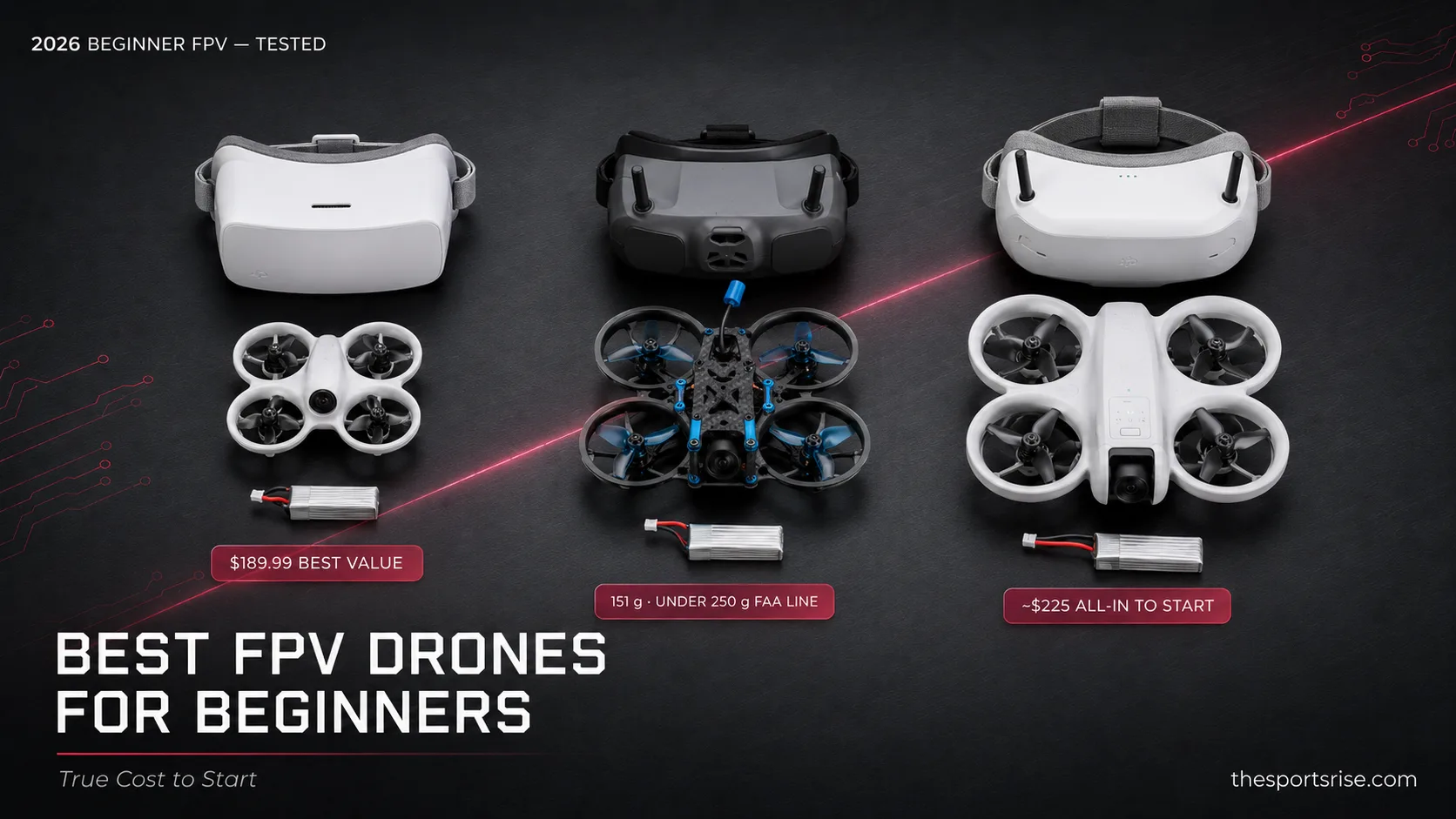
$189.99. That's the number to beat, and the BetaFPV Cetus Pro is the best FPV drone for beginners in 2026 because nothing else hands you a brushless ready-to-fly kit, goggles, controller, two batteries, and three flight modes for less. Auto-hover catches you before you ever touch full manual. That's the short answer. The honest one depends on whether you want a real racing quad or a forgiving camera drone, and how much you'll actually spend once spare batteries and a simulator hit the bill.
Key takeaways
- Best overall value: The BetaFPV Cetus Pro at $189.99 (sale) is a brushless ready-to-fly kit with goggles and a transmitter in the box. Cleanest way into FPV, full stop.
- True Cost to Start: Don't trust the sticker. The real first buy is drone plus a spare-battery pack plus a simulator, roughly $225 to $235 all-in on the Cetus Pro path.
- The 250-gram line matters: Every pick sits under the FAA's 250 g registration threshold. The DJI Neo 2 at 151 g, the whoops near 25 to 32 g. No $5 registration on any of them.
- Sim before sky: Most coaches want 10 to 20 hours in a simulator before your first real flight, with around 10 hours being where control "clicks."
- Racing vs camera: MultiGP's official Tiny Whoop class is a 65mm ducted frame on a 1S battery. That's the durable indoor class the Cetus Pro and Tinyhawk III belong to. The DJI Neo 2 is a follow-me camera drone, not a racer.
What is the best FPV drone for beginners?
| Pick | BetaFPV Cetus Pro (best value) | DJI Neo 2 (forgiving camera) |
|---|---|---|
| Price | $189.99, brushless RTF | about $599 (EU €579; US via retailer listings) |
| Weight / class | ~30 g, 65mm 1S whoop | 151 g, follow-me camera drone |
| What it's for | Learning to race, indoor/yard, 4 to 5 min flight | Stabilized 4K footage with safety nets, ~19 min flight |
For most people starting out, the Cetus Pro wins because it kills every excuse not to fly. It's brushless, which means real power and longer motor life than the cheaper brushed kits. And it bundles the parts beginners always forget to budget for.
The third pick, the EMAX Tinyhawk III RTF at $259.99, earns its spot for a less glamorous reason. Stuff breaks. When a motor or frame dies at 1 a.m., EMAX's parts catalog and troubleshooting community beat any spec sheet. The DJI Neo 2 sits apart from both, and I'll be blunt about why in a second.
Get one thing straight up front. Plenty of "best beginner FPV" lists crown the DJI Neo 2 as the top racing pick. It isn't a racing drone. DJI sells it as a personal follow-me camera and vlog drone, and it flies like one. Gentle, with obstacle sensing and altitude locks. That's a gift for a nervous first-timer and a wall for anyone who actually wants to fly a race line.
The 2026 beginner FPV ladder, ranked
Here's the whole beginner-tier ladder, three picks lined up across the variables that actually decide your first buy: weight, where you'll fly, the skill level it fits, price, and whether it arrives ready to fly. No retailer page puts these side by side, so I built one.
| Drone | Weight | Flight context | Skill level | Price (USD) | RTF? |
|---|---|---|---|---|---|
| BetaFPV Cetus Pro | ~30 g class (1S whoop) | Indoor / small yard, brushless | Total beginner to early acro | $189.99 sale ($229.99 reg) | Yes |
| EMAX Tinyhawk III RTF | 32 g | Indoor / outdoor whoop, TH0802 II 15000kv | Beginner who plans to tinker | $259.99 | Yes |
| DJI Neo 2 Motion Fly More Combo | 151 g (160 g w/ transceiver) | Outdoor camera / follow-me, 4K | Beginner wanting safety nets | about $599 (EU €579; US via retailer listings) | Yes |
Read that table top to bottom and the pattern jumps out. Price climbs with weight and camera ambition, not with racing capability. The two genuine racing-class quads sit at the bottom of the price range, and the priciest option is the least race-ready. That flips what newcomers expect.
This is the Whoop-First Ladder in action: start on a 65mm 1S whoop indoors, build muscle memory cheap, then move up to a 3-inch or 5-inch quad once you've crashed enough to stop crashing. The whoops here are durable by design. Ducted frames bounce off walls that would shatter a bigger prop.
That governing-body spec, published in the MultiGP racing class rules, is exactly why both the Cetus Pro and the Tinyhawk III count as a legitimate first racing class, not a toy. They live inside the same envelope your local MultiGP chapter flies. If you want to eventually pin a race gate, starting in this class isn't a compromise. It's the on-ramp.
BetaFPV Cetus Pro: best overall value
The Cetus Pro is the one I'd hand a friend with $200 and zero FPV history. It's brushless, and that single word separates it from the cheaper $149.99 base Cetus, which runs brushed 716-19000KV motors and just can't match the authority in the air. Don't blur the two when you shop. The names look almost identical.
What makes it beginner-proof is the three-mode system. Normal mode adds altitude hold with auto-hover.
That auto-hover is the training-wheel that lets you breathe. Take your thumbs off the sticks and the quad just parks itself at altitude. Then you climb: Normal to Sport to Manual, the N/S/M ladder, at your own pace inside one piece of hardware. No new purchase to reach full acro.
The kit is genuinely ready to fly. You get the quad, a LiteRadio 2 SE transmitter, VR02 goggles, two BT2.0 450mAh 1S batteries, and a charger. Open box, charge, fly. The catch, and it's a real one, is flight time: 4 to 5 minutes per battery. That number drives everything about how you'll actually use this drone, which leads straight to the most underrated line item in FPV. (More on that below, because it changes the math more than people think.)
Want the full economics before you commit? Our cost-to-start drone racing breakdown walks through goggles, radios, and chargers in detail.
How much does a beginner FPV setup cost?
A beginner FPV setup costs about $225 to $235 all-in on the Cetus Pro path once you add the three things you actually need to fly more than once: the drone, a spare-battery pack, and a simulator license. The sticker price alone is a trap. Here's the itemized math no retailer page bothers to total.
| Line item | What it is | Cost (USD) |
|---|---|---|
| BetaFPV Cetus Pro kit | Drone + goggles + radio + 2 batteries | $189.99 |
| Spare-battery pack | 4-pack 1S whoop batteries (the 5-Minute Battery Tax) | ~$25 to $35 |
| DRL Simulator (Steam) | Training sim license | $9.99 |
| True Cost to Start | Realistic first-purchase total | ~$225 to $235 |
That spare-battery line is the 5-Minute Battery Tax, and it's not optional. At 4 to 5 minutes of flight per pack, two batteries buys you maybe ten minutes before you're chained to a charger. Buy four more and your real session quadruples. Batteries, not the drone, set how long you actually get to fly.
The simulator line comes with a 2026 caveat worth flagging. The DRL Simulator is $9.99 on Steam, but as of early 2026 it has a reported "Server connection failed" bug in online mode. Solo and training modes still work fine, which is all a beginner needs. If you want bulletproof multiplayer, Liftoff or VelociDrone are the paid alternatives. I flipped my own call here mid-research: I was ready to say "just buy the DRL Sim, it's cheapest," and that's still true for solo training, but the server bug means I won't call it the universal pick anymore.
Scale the same formula to the other two drones and the totals shift, but the logic holds. The Tinyhawk III path runs roughly $295 to $305 all-in; the Neo 2 path lands near $635 (using its roughly $599 retailer price), though its longer flight time softens the battery tax. For a wider price-tier view across the hobby, the drone racing gear reviews hub tracks current kits as prices move.
What size FPV drone is best for beginners?
The best size FPV drone for beginners is the 65mm tiny whoop class on a 1S battery, the same spec MultiGP publishes for its Tiny Whoop racing category. Small, ducted, and light enough to bounce off furniture, whoops let you fly indoors year-round and survive the crashes that teach you the most. Bigger isn't better when you're learning.
FPV drones sort roughly into three sizes, and the gap between them is wider than the numbers let on:
- 65mm tiny whoop (1S): Indoor-safe, near-indestructible, ~25 to 32 g. The Cetus Pro and Tinyhawk III live here. Start here.
- 3-inch (toothpick / cinewhoop): Outdoor-capable, faster, still relatively forgiving. The natural second drone once whoop control feels automatic.
- 5-inch (freestyle / race): The full-power class you see in DRL footage. Fast, heavy enough to hurt, and unforgiving of input mistakes. Not a first drone.
There's a real reason racers learn on the small stuff. A 5-inch quad packs enough kinetic energy to break props, fingers, and confidence in one bad throttle punch. A whoop weighing as much as a few coins teaches the identical stick skills, throttle management, rate control, orientation, without the stakes. Pro pilots still warm up on whoops. The class never stops being useful.
And weight ties straight back to the law. The 65mm whoops sit so far under the FAA threshold that registration never enters the picture, which is the next section.
Do FPV drones require registration?
FPV drones require FAA registration only if they weigh 250 grams (0.55 lb) or more, and none of the three picks here crosses that line. The DJI Neo 2 is the heaviest at 151 g, still comfortably under, and the whoops sit near 25 to 32 g. So for these drones, flown recreationally, there's no $5 registration to file.
That spec comes straight from the FAA's official Register Your Drone guidance. The exception isn't a free pass on everything, though. Recreational flyers still need to pass the free TRUST (The Recreational UAS Safety Test) before flying outdoors, and you're still bound by airspace rules, line-of-sight requirements (a spotter covers this for goggle flying), and local restrictions. The 250-gram line, what I'd call the registration cliff, only governs the paperwork, not the responsibility.
This is one quiet advantage of starting on whoops that never makes a spec sheet. You can fly indoors entirely outside FAA jurisdiction, no registration, no TRUST, no airspace lookup, while you stack the hours that matter. Which is exactly what a simulator can't fully replace, and exactly where I'd point a beginner first.
Should you practice in a simulator before flying FPV?
Yes, you should practice in a simulator before flying FPV, and most coaches put the floor at 10 to 20 hours, with roughly 10 hours being where control suddenly clicks. A $9.99 sim license saves far more than that in broken props and crashed quads. Skipping it is the most expensive shortcut in the hobby.
I'll attach an opinion to that. Ten hours is the floor, not the goal. Some respected educators push 50-plus hours before a first real flight, and on a real quad that flies in 4 to 5 minute bursts, sim time is just the cheapest hours you'll ever log. The math is brutal in your favor: an hour in VelociDrone costs nothing per flight and resets instantly after a crash. An hour on a whoop costs you a dozen battery cycles and a few repairs.
The names worth knowing: the DRL Simulator ($9.99, the budget entry, solo mode solid despite the server bug), Liftoff, and VelociDrone, the two paid sims most competitive pilots actually train on. Any of the three teaches the core skill, flying in rates/acro with a real gamepad or, ideally, the actual radio that ships with your drone.
This sim-first habit mirrors how serious people approach any rig-based hobby. The discipline of logging virtual hours before real ones is the same one we cover in our sim racing beginner setup guide, and the muscle-memory payoff transfers more than you'd think.
RTF vs BNF vs DIY, and analog vs digital
Ready-to-fly (RTF) is the correct beginner default, and all three picks here are RTF. The acronyms decide how much you assemble before your first flight, and for a newcomer the answer is: as little as possible. Build skills come later, after you understand what you're building.
| Feature | RTF (ready-to-fly) | BNF / DIY |
|---|---|---|
| Goggles + radio | Included in the box | Usually no, buy separately |
| Setup time | Minutes | Hours to days (binding, config) |
| Hours to first flight | Charge and fly the same day | Soldering and firmware setup first |
BNF (bind-and-fly) gives you a built quad but no radio or goggles, assuming you already own them. DIY means soldering a flight controller, motors, and a video system yourself, which is rewarding and a terrible way to start. Begin RTF. You'll build your second drone with confidence you can't fake on day one.
One more fork: analog vs digital HD video. Analog is cheaper, lighter, and runs near-zero latency, which is why it still rules the whoop and entry-racing world. The Cetus Pro and standard Tinyhawk III are analog. Digital HD (DJI's system, HDZero) gives a crisp picture but costs more, which is why EMAX's HDZero Tinyhawk III Plus line jumps to $489.99 to $499.99. For learning, analog's lower latency is arguably the better teacher anyway.
What to avoid, and the buying-guide shortlist
The fastest way to torch money on your first FPV drone is buying a cheap brushed toy quad with a fixed camera angle and no upgrade path, the kind that floods marketplace listings under $80. They fly poorly, break fast, and teach habits you'll have to unlearn. A short checklist keeps you out of that trap.
Look for: brushless motors, an included transmitter and goggles (true RTF), multiple flight modes that include a manual/acro option, and a real spare-parts catalog from the maker. Avoid: brushed-only toy quads, anything that only flies in self-level "headless" mode with no acro path, and kits that won't name their battery type or motor spec. If a listing hides the motor KV and frame size, that's the tell.
The DJI Neo 2 deserves its own line in any buying guide because it's the outlier. At about $599 for the Motion Fly More Combo (DJI's launch materials list €579 in the EU, with US buyers relying on retailer listings since the Neo 2 wasn't officially US-available at launch), it ships with Goggles N3 and the RC Motion 3 controller, sees in 4K up to 100fps, flies about 19 minutes per battery (17 with prop guards), and adds omnidirectional vision plus forward LiDAR obstacle sensing. That's a remarkable camera drone with FPV-style goggle immersion and heavy safety nets. It's the right call for someone who wants stabilized footage and a soft landing, and the wrong call for someone who wants to fly a race line in manual. Keep it distinct from the older $199 DJI Neo and the DJI Avata 2, DJI's actual FPV freestyle drone, which competitor lists keep conflating.
If your real interest is the racing side, the broader scene is worth knowing before you buy, and our drone racing hub tracks the leagues, classes, and pilots that define where this hobby goes after the whoop stage. The skill ladder there looks a lot like the gear ladder in this guide.
Pros and cons of the top pick
Affiliate disclosure: thesportsrise.com may earn a commission if you buy through links on this page, at no extra cost to you. Prices were verified against official manufacturer and federation pages and reflect 2026 figures.
The BetaFPV Cetus Pro is the pick I keep coming back to, so here's the honest balance sheet.
| Factor | Cetus Pro strength | Cetus Pro tradeoff |
|---|---|---|
| Power system | Brushless, real authority and motor life | Costs about $40 more than the brushed base Cetus |
| Learning curve | N/S/M modes with auto-hover safety net | Manual mode still demands real practice |
| Flight time | Quick swaps on cheap 1S packs | Only 4 to 5 min per battery, plan to buy spares |
Pros: brushless power at a sub-$200 sale price; truly ready to fly with goggles, radio, and two batteries in the box; three flight modes that carry you from auto-hover to full manual; sits in the durable 65mm whoop class. Cons: short 4 to 5 minute flight time makes spare batteries mandatory; analog video isn't the sharpest picture; easy to confuse with the cheaper brushed base Cetus when shopping.
The verdict: build your True Cost to Start, then buy
Buy the BetaFPV Cetus Pro. It's the best FPV drone for beginners in 2026, but the smarter framing is the True Cost to Start: budget the ~$225 to $235 all-in for drone, spare batteries, and a sim, not the $189.99 sticker, and you'll actually enjoy the hobby instead of bouncing off it. Grab the Tinyhawk III instead if parts-availability peace of mind beats saving $70, and reach for the DJI Neo 2 (about $599 where you can find it) only if you want a camera drone with training wheels rather than a racer.
Here's what to watch next, and a checkable prediction. By the end of 2026, expect at least one of these RTF whoop kits to ship a bundled sim license or a four-pack of spare batteries in the box, because the gap between sticker price and real first spend has gotten too obvious to ignore. Start small, log your sim hours, and buy the spares before you buy the dream. If the gear bug spreads to adjacent rigs, our best beginner sim racing wheels guide runs the same start-smart logic in a different cockpit.
Frequently asked questions
What drones do drone racers use?
Competitive drone racers fly custom 5-inch quads at the top level, but most learn and warm up on 65mm tiny whoops first. Pro leagues like the Drone Racing League run spec-built racing quads on dedicated courses, while local MultiGP chapters race classes from the Tiny Whoop 65mm 1S frame up to full 5-inch builds. The hardware ladder mirrors the skill ladder.
Are FPV drones hard to fly?
FPV drones are tough at first because full manual (acro) mode gives no self-leveling, but beginner kits soften the curve with assisted modes. The BetaFPV Cetus Pro, for example, starts in Normal mode with altitude-hold auto-hover before you move to Sport and Manual. Paired with simulator practice, most beginners reach comfortable line-of-sight flying within a few weeks of regular sessions.
Should I buy ready-to-fly or build my own first drone?
Beginners should buy ready-to-fly. RTF kits like the Cetus Pro and EMAX Tinyhawk III include the goggles and radio and need only charging before the first flight, while DIY builds require soldering a flight controller and configuring firmware. Building your own is a rewarding second project once you understand how each component behaves in the air.
What is the cheapest way to start FPV the right way?
The cheapest legitimate FPV start is a brushless RTF whoop plus a $9.99 simulator, skipping the sub-$80 brushed toy quads that break fast and teach bad habits. The base BetaFPV Cetus at $149.99 is brushed and the lowest real entry, but the brushless Cetus Pro at $189.99 is worth the extra spend for power and motor longevity. Add spare batteries before flying.
Does the DJI Neo 2 count as a racing drone?
No. The DJI Neo 2 is a 151-gram follow-me camera and vlog drone with 4K video and omnidirectional obstacle sensing, not a racing quad. DJI's true FPV freestyle and racing drone is the Avata 2, a separate product. Beginners who specifically want to race should start on a 65mm whoop like the Cetus Pro or Tinyhawk III, which fit MultiGP's published racing class.
How long do beginner FPV drone batteries last per charge?
Beginner whoop batteries last about 4 to 5 minutes of flight each, as on the BetaFPV Cetus Pro's 1S 450mAh packs. The heavier DJI Neo 2 reaches roughly 19 minutes (17 with prop guards) thanks to its larger battery. Because whoop flights are short, a four-pack of spare batteries is the single best first add-on for more airtime per session.
Conversation
Be the first to comment.
Leave a comment
Comments are reviewed before appearing. Your email stays private.